How to Download Pinterest Reels: Save Vertical 9:16 Videos
Learn how to save a Pinterest Reel as an MP4, what makes Reel Pins different, why some downloads fail, and what to check when audio or video is missing.
What is a Pinterest Reel?
A Pinterest Reel is a short-form video presented in a vertical, full-screen style. Many Reel-style Pins use a 9:16 layout, but the exact dimensions can vary by the source. What matters for downloading is the video file behind the Pin, not only how it looks in the Pinterest app.
How to download a Pinterest Reel
- Open the Reel or video Pin in Pinterest.
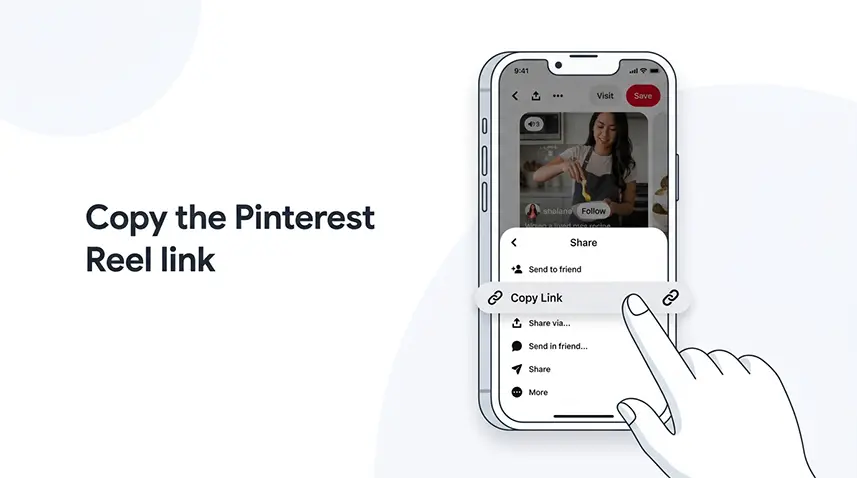
- Use the share option and copy its link.
- Open Snapzia Pinterest Reel Downloader.
- Paste the link and start the download.
- Choose the available video file and save it to your device.
The available quality and format depend on the source that Pinterest makes accessible. A downloader cannot create detail that is not present in the source.
What if Pinterest shows no download button?
Pinterest can show different download options depending on the Pin and the creator’s settings. If the native option is missing, that does not automatically mean the link is broken. Copy the public Pin URL and let the downloader check the accessible source. If the source itself is unavailable or restricted, the download may not be possible.
Does a downloaded Reel keep its sound?
If the accessible video source contains an audio track, the downloaded file can include it. If the file plays without sound, first play the original Pin in Pinterest. Then check your device volume, Bluetooth output and player compatibility. For a deeper diagnosis, see Pinterest video has no sound.
Where is the downloaded Reel saved?
On most phones and computers, the browser saves the file in its normal Downloads location unless you selected another folder. On iPhone, check Safari’s Downloads area and the Files app. On Android, check the browser’s Downloads folder and your device’s file manager.
Reel downloader or regular video downloader?
Use the Reel-specific page when your goal is a Reel-style vertical Pin. If you are simply downloading a normal video Pin, the general Pinterest Video Downloader is the broader option. Both workflows start with the public Pin link.
When a Reel will not download
- Make sure you copied the Pin link, not a search or profile URL.
- Try opening the link in a browser first.
- Check whether the Pin is public and still available.
- If the result is an image instead of video, the Pin may not expose a downloadable video source.
- If the download fails repeatedly, follow Pinterest video downloader not working.
Quick checklist
Copy the correct public Pin link → paste it into the Reel Downloader → select an available file → check the Downloads folder → play the saved file before moving or editing it.
Frequently Asked Questions
What is a Pinterest Reel?
What is a Pinterest Reel? A Pinterest Reel is a short-form video presented in a vertical, full-screen style. Many Reel-style Pins use a 9:16 layout, but the exact dimensions can vary by the source. What matters for…
How to download a Pinterest Reel
How to download a Pinterest Reel Open the Reel or video Pin in Pinterest. Use the share option and copy its link. Open Snapzia Pinterest Reel Downloader . Paste the link and start the download. Choose the available…
What if Pinterest shows no download button?
What if Pinterest shows no download button? Pinterest can show different download options depending on the Pin and the creator’s settings. If the native option is missing, that does not automatically mean the link is…
Does a downloaded Reel keep its sound?
Does a downloaded Reel keep its sound? If the accessible video source contains an audio track, the downloaded file can include it. If the file plays without sound, first play the original Pin in Pinterest. Then check…
Where is the downloaded Reel saved?
Where is the downloaded Reel saved? On most phones and computers, the browser saves the file in its normal Downloads location unless you selected another folder. On iPhone, check Safari’s Downloads area and the Files…

Ready to download a Pinterest video?
Paste your Pinterest link and download the available video directly in your browser.