Pinterest to MP4 Converter
Download Pinterest Videos as MP4 — Fast, Free, and Online.
How to Download Pinterest Videos as MP4
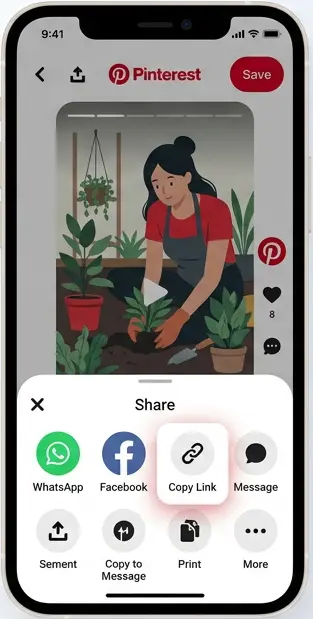
#Copy the Pinterest Video Link
Open Pinterest in the app or browser, find the video Pin you want to save, tap Share, and copy its link.
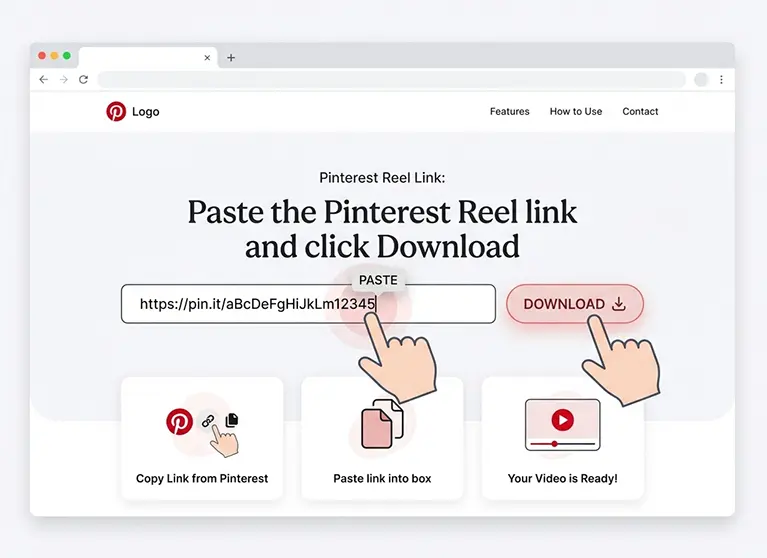
#Paste the Link
Paste the copied Pinterest video link into the input box above.
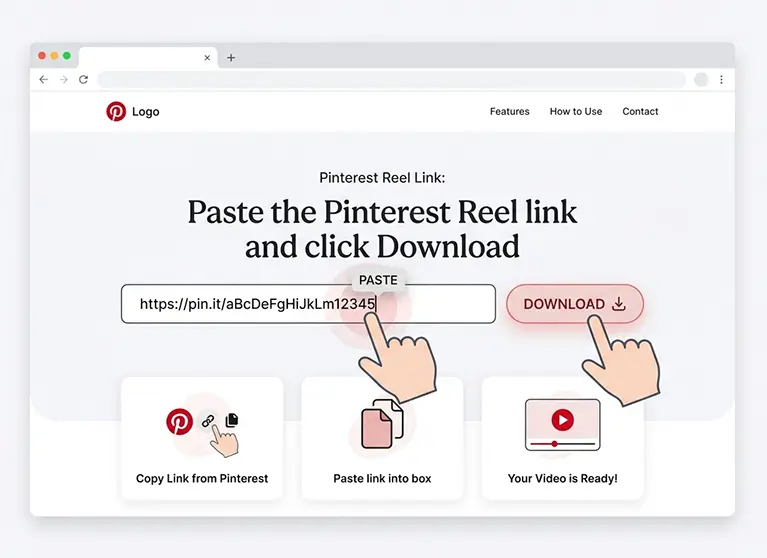
#Download the MP4 Video
Click the Convert button, process the video, and download it as an MP4 file ready to play on your device.
A Free Online Pinterest to MP4 Converter
Snapzia lets you download publicly available Pinterest videos as MP4 files directly in your browser. Save Pinterest videos quickly without installing software or an app.
No app, sign-up, or software is required. Simply paste the Pinterest video link and download the available MP4 version in the quality provided by Pinterest.
Why Use Our Pinterest to MP4 Converter
Download Pinterest videos as MP4 files with a fast, simple, and browser-based tool designed for phones, tablets, and computers.
MP4 Video Format
Download Pinterest videos as widely compatible MP4 files that are easy to play, save, and share across supported devices.
HD, 1080p, and 4K Quality
Download the available video quality provided by Pinterest, including HD, 1080p, or 4K when a higher-resolution version is available.
No Watermark Added
Snapzia does not add its own logo or watermark to your downloaded Pinterest video.
Works on All Devices
Download Pinterest videos on your phone, tablet, or computer directly from your browser without installing an app.
Fast MP4 Downloads
Process your Pinterest video link quickly and get your MP4 download without unnecessary steps.
No App or Account
Use the Pinterest to MP4 downloader directly in your browser with no app installation, software, or account required.
Why Choose Our Pinterest to MP4 Converter
Fast, browser-based processing for convenient Pinterest MP4 downloads.
Preview your Pinterest video before downloading when a preview is available.
Mobile-friendly design that works smoothly on phones, tablets, and computers.
Free to use with no registration required.
Private and secure — we do not store your downloaded videos.
Quick results without creating an account or installing software.
Frequently Asked Questions
-
Is this Pinterest to MP4 converter free?
Yes. Snapzia is free to use for downloading publicly available Pinterest videos as MP4 files, with no registration required.
-
Will the MP4 file have a watermark?
No. Snapzia does not add a logo or watermark to the downloaded Pinterest video. Any watermark already present in the original video remains part of the source.
-
Do I need to install any software to download Pinterest videos as MP4?
No. Snapzia works directly in your browser, so you do not need to install an app or desktop software to download Pinterest videos as MP4.
-
Can I download private Pinterest videos as MP4?
No. Snapzia only works with publicly accessible Pinterest videos. Private or restricted content cannot be downloaded.
-
What video quality will I get?
You can download the highest available quality provided by Pinterest for the video, including HD, 1080p, or 4K when available.