Pinterest Video Downloader
Snap Pinterest videos in HD and 4K
How to Download Pinterest Videos in 3 Steps
#1. Copy the Pinterest link
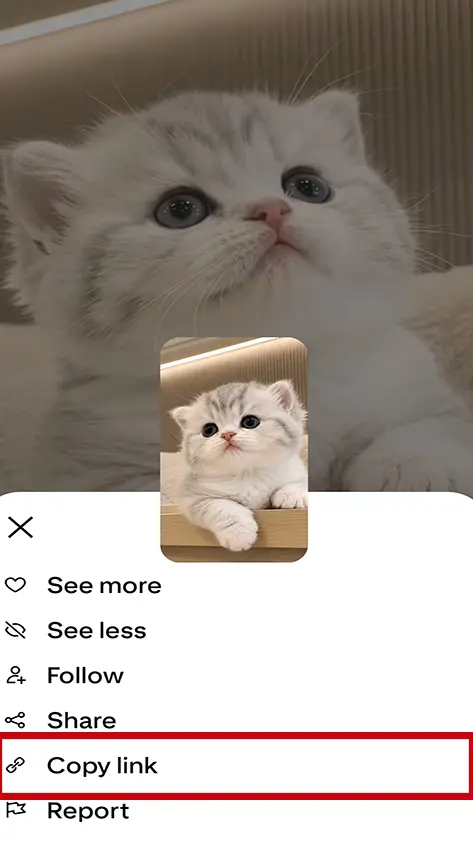
Open the Pinterest app or website, select the video, tap •••, then choose "Copy Link".
#2. Paste the video link
Paste the link you copied into the field above, then click the download button.
#3. Download the video
Click the download button and the video will start downloading right away.
Download Pinterest Videos Online with Snapzia
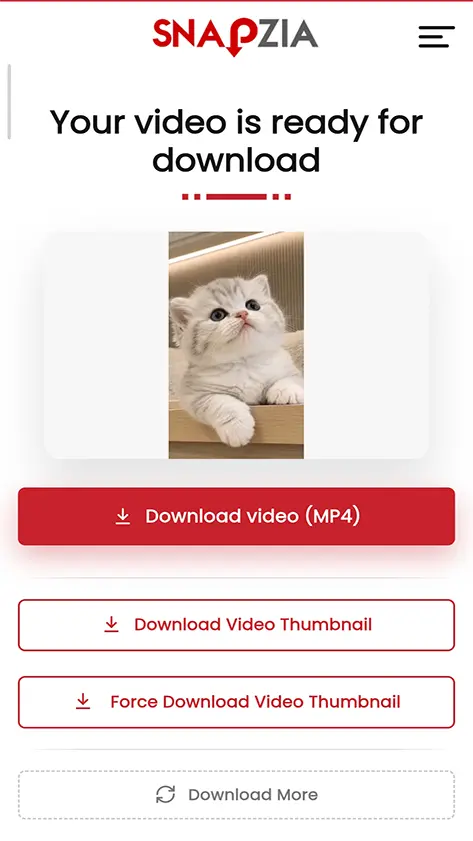
Snap Pinterest is a free tool for downloading Pinterest videos without any software or apps. You can download a video from Pinterest easily by copying the video link from the Pinterest site or app, then pasting it into the download box above. Once the link is processed, Snapzia shows a video preview along with direct download links, so you can download Pinterest videos quickly and in high quality straight from your browser.
How to Download Pinterest Videos Without a Watermark
To download Pinterest videos from Snap Pinterest, follow these simple steps:
-
Open the Pinterest app or website, select the video you want to download, and tap •••,
-
Paste the Pinterest video link you copied into the download box above.
-
Click the download button and wait for the link to be processed.
-
A preview of the file will appear along with the available download options.
-
Click the download button to save the file to your device.
Pinterest Video Downloader Features
Download Pinterest videos in high quality with Snapzia. Save available videos in HD, Full HD, 2K, or 4K with audio, without installing software or creating an account. Snapzia works directly in your browser on phones, tablets, and computers.
Download Pinterest Videos in HD and 4K
Download Pinterest videos in the highest quality available from the source, including HD, Full HD, 2K, and 4K when available. Preserve video quality and audio for a better viewing experience.
Works on All Devices
Use Snapzia on Android, iPhone, Windows, Mac, tablets, and other modern devices. Everything works directly through your web browser without installing an external app.
100% Free Pinterest Downloads
Download Pinterest videos for free with no subscription or payment required. Limited advertising helps us maintain and improve the service.
No Watermark Added by Snapzia
Download Pinterest videos without a watermark added by Snapzia. We do not place our logo, text, or additional branding on the downloaded video.
Fast Pinterest Video Downloads
Download Pinterest videos quickly without unnecessary waiting. Simply paste the Pinterest link, process it with Snapzia, and save the available video in just a few steps.
No Sign-up or Login Required
You do not need to create an account or log in to use Snapzia. Paste your Pinterest video link and start downloading directly from your browser.
How to Download Pinterest Videos on iPhone, Android, and Computer
Learn how to download Pinterest videos on your phone or computer using Snapzia. Follow the instructions for your device to save videos from public Pinterest Pins.
How to Download Pinterest Videos on iPhone
To download a Pinterest video on iPhone, open Pinterest in Safari and find the video you want to save. Copy the full Pin URL, open Snapzia in your browser, and paste the link into the downloader. After the video is detected, choose the available download option to save the Pinterest video directly to your iPhone or iPad.
How to Download Pinterest Videos on Android
To save a Pinterest video on Android, open the Pinterest app or website and find the video you want to download. Copy the Pin URL and paste it into Snapzia using Chrome or another mobile browser. Once the video is detected, select the available download option and save the video to your Android device.
How to Download Pinterest Videos on Computer
To download a Pinterest video on a computer, open Pinterest in Chrome, Edge, Firefox, or another browser and find the video you want to save. Copy the complete Pin URL and paste it into Snapzia. When the video is detected, choose the available download option and save the Pinterest video to your computer.
Tips for Fast and Easy Downloads
Follow these simple tips to download Pinterest videos, images, and GIFs smoothly and get the best available quality.
Use Public Pinterest Links
Make sure the Pin is publicly accessible. Public Pinterest links allow Snapzia to detect and process the available media correctly.
Copy the Full Pin URL
Copy the complete Pinterest Pin URL from the app or your browser address bar and paste it into Snapzia for faster detection.
Choose the Best Available Quality
Snapzia automatically detects the highest available quality for the media, helping you save Pinterest videos, images, and GIFs with the best resolution available.
Download Pinterest Video Thumbnails
Snapzia lets you download Pinterest video thumbnails separately from the video. Get the thumbnail from a public Pinterest Pin and save it in high quality.
Pinterest Thumbnail Downloader
Use Snapzia to download a Pinterest video thumbnail without saving the entire video. After processing your Pin, the thumbnail is available as a separate download option.
High-Quality Pinterest Thumbnails
Snapzia extracts the available thumbnail image from the Pinterest video and lets you save it without unnecessary compression or editing.
How to Download a Pinterest Video Thumbnail
Paste a public Pinterest Pin link into Snapzia and start the download. When the video is processed, choose Download Thumbnail to save the video thumbnail separately.
Quality & Supported Formats
Snapzia helps you download available Pinterest videos, images, and GIFs in the best quality supported by the original content. The available resolution and file format may vary depending on the Pinterest Pin.
Download Pinterest Videos in the Best Available Quality
Snapzia automatically detects the highest available quality for the Pinterest video. Depending on the original Pin, the available resolution may include HD, Full HD, 2K, or 4K. The actual quality depends on the version provided by Pinterest.
Supported Video Format
Pinterest videos downloaded through Snapzia are provided in the available MP4 format when supported by the source. MP4 offers broad compatibility with phones, tablets, computers, and most modern video players.
Supported Image Formats
Pinterest images can be available in common formats such as JPG, PNG, or WebP, depending on the original media source. Snapzia preserves the available image format whenever possible.
Pinterest GIF Support
Snapzia can process available animated GIF content from public Pinterest Pins. The final format and quality depend on the media provided by Pinterest for that Pin.
Pinterest Carousel Formats
Pinterest carousel Pins can contain multiple images or videos in a single Pin. Snapzia processes the available media from supported public carousel Pins and allows each available item to be downloaded in its provided format and quality.
Pinterest Board Download Formats
Pinterest boards can contain different types of Pins, including images, videos, and GIFs. Snapzia processes the supported media available from public boards and provides the available files in their original or supported formats and quality.
Why Is My Pinterest Video Not Downloading?
If your Pinterest video is not downloading, check the following common issues. These simple solutions can help you identify the problem and download supported Pinterest content successfully.
Make Sure the Pinterest Pin Is Public
Snapzia works with publicly accessible Pinterest content. If the Pin belongs to a private account or is not publicly available, the video may not be accessible for processing or downloading.
Check the Pinterest URL
Make sure you copied the complete Pinterest Pin URL. Open the Pin in the Pinterest app or your browser, copy the full link, and paste it into Snapzia again. An incomplete or incorrect URL may prevent the video from being detected.
The Content May Not Be Supported
Some Pinterest Pins may contain media that is not currently supported by the downloader. Content availability can vary depending on the type of Pin and the media provided by Pinterest.
Try Again Later
A temporary issue with Pinterest, the media source, or the connection may prevent a video from being processed. Wait a moment, refresh the page, and try the Pinterest link again.
Try Another Browser or Device
If the download does not start, try using another modern browser such as Chrome, Safari, Edge, or Firefox. You can also try Snapzia on another device to rule out a temporary browser or device issue.
Why Choose Snapzia?
Fast Download
Works on Any Browser
No Account Needed
Supports Mobile and Desktop
Preview Before Download
100% Free to Use
Frequently Asked Questions
-
How do I download a video from Pinterest without a watermark?
Copy the video link from the Pinterest app, then paste it into the input box on the Snapzia site and click download. Choose your preferred quality (HD or 4K) and the video will be saved without a watermark directly to your device.
-
Is downloading Pinterest videos free on Snapzia?
Yes, Snapzia is 100% free. There are no hidden fees or subscriptions required. You can download Pinterest videos, images, and reels without limits and without paying anything.
-
Where is the video saved after downloading from Pinterest?
On computer: saved to the "Downloads" folder. On iPhone: saved to the "Files" or "Photos" app. On Android: saved to the "Downloads" or "Gallery" folder.
-
On Windows, press Ctrl + J on your keyboard to view your download history.
-
On Mac, press Cmd + Shift + J on your keyboard to view your download history.
-
On phone, check your browser's default download folder.
-
-
Does Snapzia support downloading Pinterest videos in 4K quality?
Yes, Snapzia supports downloading Pinterest videos in 4K, Full HD 1080p, and HD 720p, depending on the original quality available on Pinterest. We give you the highest quality available with no watermark.
-
Can I download Pinterest images without a watermark?
Yes, you can download Pinterest images in high quality without a watermark. Copy the image link from Pinterest and paste it into Snapzia, then click download and the image will be saved as JPG or PNG.
-
Do I need to install a program to download Pinterest videos?
No, you don't need to install any program or app. Snapzia works directly from the browser on iPhone, Android, and computer. Just copy the link, paste it, and download.
-
Is the Snapzia site safe for downloading Pinterest videos?
Yes, Snapzia is completely safe. We don't ask for personal data, we don't store videos on our servers, and we don't track your activity. All downloads happen directly from Pinterest's servers to your device.
-
Can I download Pinterest Reels?
Yes, Snapzia supports downloading Pinterest Reels. Copy the reel link and paste it into the site, then choose your preferred download quality.