Pinterest 4K Downloader Online Without Watermark
Snapzia Downloader is a browser-based Pinterest Video Downloader that allows you to download videos, images, and GIFs from publicly accessible Pinterest Pins. Simply paste a Pinterest link above to generate available download options instantly.
The tool works directly in your browser without requiring installation or login credentials. It processes only public Pins and does not host or store media files.
How to Download from Pinterest (Step-by-Step Guide)
Follow these simple steps to download Pinterest videos, images, or GIFs using Snapzia.
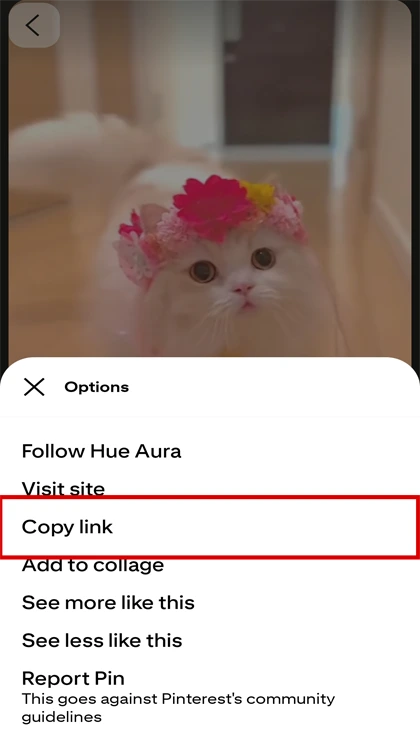
#1. Copy the Pinterest link
Open the Pin, tap Share (or •••), then choose Copy link.

#2. Paste the link
Paste the URL into the box above and click Download.
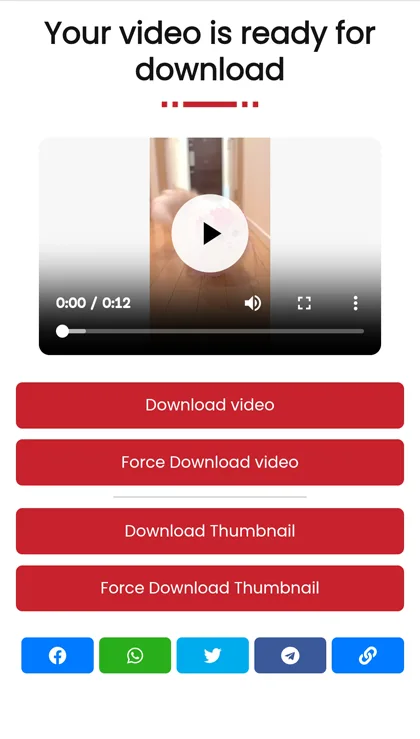
#3. Save it to your device
Choose the available format (Video / Image / GIF) and save it in one click.
What is Snapzia Pinterest Downloader?
Snapzia is a free online Pinterest downloader that helps you download Pinterest videos (MP4), images, and GIFs in high quality. Paste a Pinterest link and get direct download options in seconds. It works on mobile, tablet, and desktop — no app and no registration.
Snapzia Downloader Key Features
No sign-up and no software installation.
Works on iPhone, Android, Windows & Mac in your browser.
Download Pinterest videos without watermark.
Supports HD & 4K quality (when available on the original Pin).
Force Download option if the file opens in a new tab.
Download Pinterest Videos in HD & 4K Quality
Snapzia is a powerful and easy-to-use Pinterest Video Downloader that lets you download Pinterest videos online in high quality, including HD and 4K when available. Just paste the Pinterest URL above and generate download options instantly.
Whether you want to save a tutorial, keep creative inspiration, or store a video for offline viewing, Snapzia provides a fast and reliable experience. If you’re looking for a clean Pinterest video downloader without watermark or a stable option when other tools fail, Snapzia is built to work consistently.
Pinterest Downloader Online (Videos, Images & GIFs)
Many Pins include videos, images, and GIFs you may want to keep for personal reference. Snapzia helps you download publicly accessible content without hosting or storing any media files — content remains on Pinterest’s servers. We simply generate download options for the link you provide.
Tip: If your browser opens the file in a new tab instead of downloading it, use the Force Download option to save it directly.
High Quality Pinterest Image Downloader
Need images or GIFs? Snapzia also works as a Pinterest image downloader and GIF downloader. Paste the Pin link, generate the available formats, and download in seconds.
Download Pinterest Videos on iPhone (No App Required)
Want to download Pinterest video on iPhone without app? Snapzia runs in Safari and other iOS browsers. Paste the Pinterest URL, tap Download, and save the file to Photos or Files depending on your iOS settings.
Download Pinterest Video on Android
On Android, Snapzia works smoothly in Chrome. Paste the Pin link and download — the file will be saved using your browser’s default download path.
Pinterest Video Downloader for PC (Windows & Mac)
If you need a Pinterest video downloader for PC, Snapzia supports Windows and Mac with no installation. Paste the link and download the video in high quality.
Fix: Pinterest Video Not Downloading
If you see issues like Pinterest video not downloading or Pinterest video download failed, try:
- Refresh the page and try again using the full Pinterest URL.
- Make sure the Pin is public and accessible.
- If the file opens in a new tab, use Force Download.
- Copy the link again from the Share menu to avoid incomplete URLs.
Is It Legal to Download Pinterest Videos?
Downloading publicly accessible content for personal use may be permitted depending on your local laws. Re-uploading or using copyrighted content for commercial purposes without permission may violate intellectual property rights. Snapzia does not host media files and does not store downloads — content stays on Pinterest’s servers. Users are responsible for how downloaded content is used.
Ready to download? Paste your Pinterest link above and use Snapzia to download Pinterest videos online quickly and safely.
Frequently Asked Questions
-
Do I need to register an account to download from Pinterest?
No. Snapzia works without registration or login.
-
Is Snapzia safe to use?
Snapzia doesn’t require personal data to use the downloader. Always download content you have permission to use.
-
Where are my downloads saved?
Downloads are usually saved in your browser’s default Downloads folder.
-
If you are using Windows, press Ctrl + J to see download history.
-
If you are using Mac, press Cmd + Shift + J to see download history.
-
If you're using a smartphone, check your browser's default download path.
-
-
Does Snapzia store downloaded files?
No. Snapzia does not store your downloaded files.
-
How to download Pinterest videos on Android?
Copy the Pin link → paste it into Snapzia → click Download.
-
Is Snapzia free?
Yes. Snapzia is free to use.